The app has had seven logos since it first appeared on the Microsoft Store in 2020. Here they are in order, with the version that brought each one.
-
 June 2020
The first icon: a blue folder, for a "modern dual pane file manager". Fun fact: it was literally a picture of an actual physical file folder.
-
 October 2020, version 0.19
The folder gets an S.
-
 January 2021
A bolder S in white, with a woven texture, on a blue folder.
-
 February 2021, version 0.37
The folder goes, and the S becomes a ribbon folding back on itself. Every logo since has been based on this ribbon.
-
 March 2022, version 1.57
The new Pro X version, still in beta, gets its own colors.
-
 May 2022, version 1.74
The ribbon turns blue, days before Shrestha Files Pro X 2.0 launched.
-
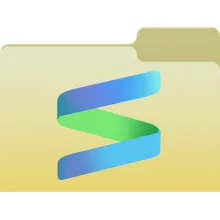
 May 2023, version 3.0
The ribbon goes back on a folder. This is the logo the app uses today.
Ideas along the way
Not every design made it into the app. Putting the ribbon on a folder was first tried in September 2021, around the time work on the new Windows App SDK version was getting started. And two days before the purple Pro X logo was finished, a version with a blue and purple gradient was on the table.

The name changed too
The app started out as Shrestha Files, and the paid version was Shrestha Files Pro. The rebuilt version launched in May 2022 as Shrestha Files Pro X, and by version 3.0 in May 2023 it was S Files Pro X.